Roku TV Replacement Remote Control, Wireless Smart TV Remote with Shortcut Keys for Netflix, Hulu, YouTube and Amazon
Roku TV Replacement Remote Control, Wireless Smart TV Remote with Shortcut Keys for Netflix, Hulu, YouTube and Amazon
Couldn't load pickup availability
Roku TV Replacement Remote Control, Wireless Smart TV Remote with Shortcut Keys for Netflix, Hulu, YouTube and Amazon
Looking for a reliable Roku TV replacement remote that works right out of the box? This wireless remote is designed specifically for Roku smart TVs, not Roku streaming sticks or players, and gives you full control of your TV with an intuitive button layout, dedicated streaming shortcuts, and an 8-metre wireless range. Whether your original remote was lost, damaged, or simply worn out, this is a straightforward, affordable solution that gets you back to watching without hassle. Browse our full smart gadgets and electricals collection for more home tech accessories.
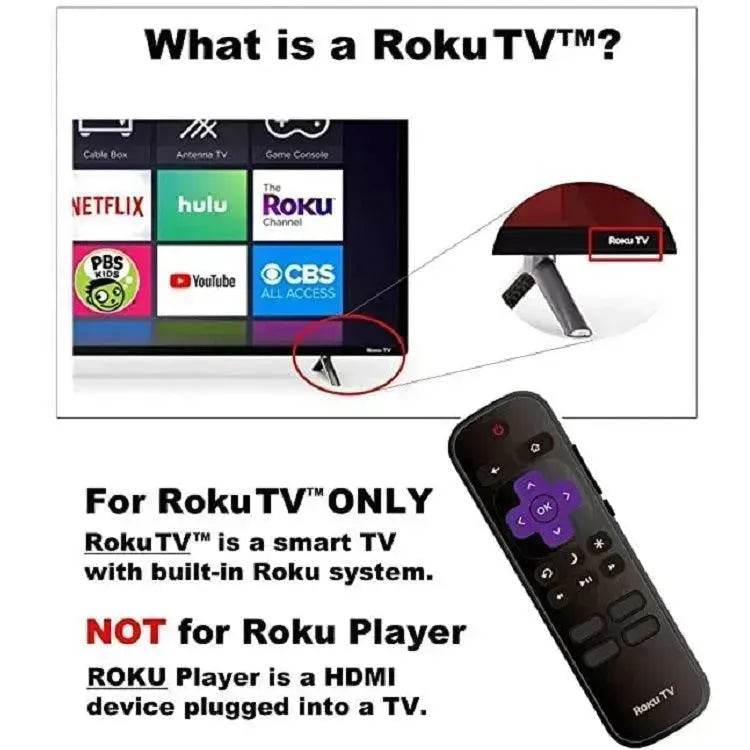
Important: This remote is compatible with Roku TVs only. It is not compatible with Roku HDMI streaming players, Roku sticks, or Roku Express boxes.
Key Features
- Designed for Roku smart TVs with Roku built in, not for Roku streaming devices
- 8-metre wireless transmission range for comfortable control from across the room
- Dedicated one-touch shortcut buttons for Netflix, Hulu, YouTube, and Amazon
- Central directional navigation pad with OK button for smooth menu scrolling
- Full media controls including play, pause, rewind, and fast forward
- Compact, ergonomic design that fits comfortably in hand
- Simple setup: insert batteries, point at TV, and it works
- Batteries not included
Product Specifications
- Compatible with: Roku TVs (built-in Roku only, not Roku players or sticks)
- Transmission range: Up to 8 metres
- Color: Black
- Weight: 45 g
- Packing: 1 x Roku TV Remote Control (batteries not included)
- SKU: CJZN115327601AZ
Compatibility Notes
This remote works with Roku-branded smart TVs that have Roku software built directly into the television. It does not work with external Roku devices such as the Roku Express, Roku Streaming Stick, Roku Ultra, or any other Roku HDMI player. If you are unsure whether your TV qualifies, check the model number on the back of your TV or in the TV settings menu for a Roku logo or Roku OS indicator.

The remote features a clean, well-spaced button layout that makes it easy to navigate menus, adjust volume, and jump directly to your favourite streaming apps. The purple directional pad is easy to locate by feel, reducing the need to look down while watching.


At 45 g, the remote is lightweight enough for extended use without fatigue. The slim profile fits naturally in most hands and works well for both adults and older users who prefer a straightforward, no-frills remote layout. Explore more practical home tech in our trending products collection.
Who This Is For
- Roku TV owners who have lost or damaged their original remote and need a quick replacement
- Anyone setting up a spare or guest room TV with a Roku smart TV
- Households that want a backup remote for the main living room setup
- Shoppers looking for an affordable, no-setup streaming remote for a Roku TV in Canada
- Those buying a practical, useful gift for someone with a Roku TV at home
FAQ
Will this work with my Roku streaming stick or Roku Express?
No. This remote is designed for Roku smart TVs only, meaning televisions with Roku built directly into the TV. It is not compatible with external Roku streaming devices such as the Roku Express, Roku Stick, or Roku Ultra.
Does it require any pairing or setup?
Setup is minimal. Insert the required batteries (not included), point the remote at your Roku TV, and it should work immediately. No app or Wi-Fi connection is required.
What streaming apps have shortcut buttons?
The remote includes dedicated one-touch shortcut buttons for Netflix, Hulu, YouTube, and Amazon, allowing you to launch these apps directly without navigating through menus.
What is the wireless range?
The remote has a transmission range of up to 8 metres, which is sufficient for most living rooms, bedrooms, and home office setups.
Does EX-STOCK ship this across Canada?
Yes. We ship to all provinces and territories across Canada, including Ontario, British Columbia, Alberta, Quebec, and beyond.
How to Use
Insert two AAA batteries into the battery compartment on the back of the remote (batteries not included). Point the remote at your Roku TV and press any button to confirm it is working. Use the directional pad to navigate menus, the OK button to select, and the shortcut buttons to launch streaming apps directly. The volume and mute buttons control your TV's audio output.
At EX-STOCK Canada, we source home electronics and accessories from verified suppliers to bring you reliable quality at accessible prices. Every product in our catalogue is selected for real-world usability and dependable performance. Find more home tech essentials in our home and kitchen appliances collection.